
Dave Anderson
danderson@hachyderm.io
TIL Kicad's builtin font is defined as a set of Kicad symbol libraries, which (mis) use symbol features like pins to mark out important locations that matter for fonts. Then a python script goes brrr to convert all those "component symbols" into a C++ file containing hardcoded glyphs.
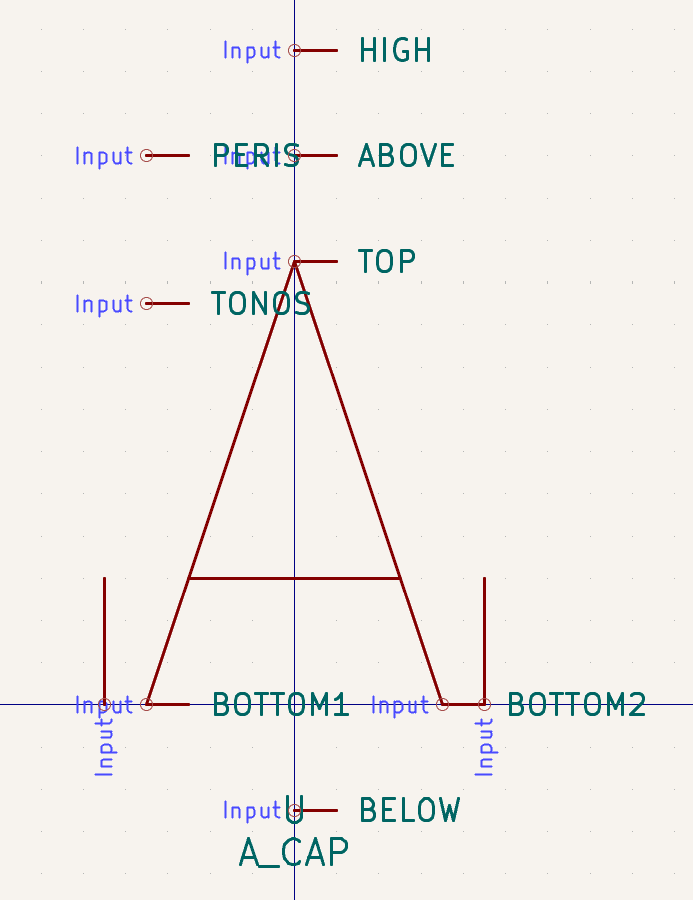
Here's the latin capital letter A, for instance.
It's... quite cursed? I went into this to try and see if I could find an easy way to extract an approximate size of individual glyphs, and the answer appears to be "lol, lmao".
 2
2
 7
7
 1
1
Dave Anderson
danderson@hachyderm.ioOh also the font is defined as _combinations_ of these glyphs. That's why there are all those position anchors on the capital letter A, because then there's a charlist.txt that maps the supported unicode codepoints to some combination of these glyphs, welded together at those control points. For example A with an acute accent is defined as:
+ A_CAP ACUTE ABOVE=X
I don't know exactly how to parse this custom format yet, but you can kinda see that it's saying "take the A_CAP glyph, then paste the ACUTE glyph at the position marked "ABOVE". Sort of.
1
0
0
Dave Anderson
danderson@hachyderm.iooh I see, "X" is a point defined (again using a component pin) in the ACUTE glyph. So, this is saying that the point ACUTE.X should be positioned at A_CAP.ABOVE.
I mean it makes sense, but also...
1
0
0
Dave Anderson
danderson@hachyderm.iooh wow the python code that renders this font into a C file parses S-expressions with regular expressions. That... is certainly something you could do. I mean empirically you can, since it works, but...
1
0
0
Dave Anderson
danderson@hachyderm.ioUnfortunately this is all quite bespoke and tailored specifically for nothing but creating the C++ source file that Kicad itself uses to wrangle the font, afaict if I want to obtain the glyphs in a different form that I can use, I'm going to have to reimplement a lot of the bespoke parsing and wrangling.
Which I guess is fine since I was already doing that in reverse to write Kicad symbol files, but parsing them back deeply enough to be able to do geometry transforms on them is still quite a task.
1
0
0
Dave Anderson
danderson@hachyderm.ioOoor I can go with my original plan A, which was to just brute-force generate a symbol library where each symbol is a single character, then use kicad-cli to render that out to svg, then parse that back out to determine the bounding box on each glyph.
It's not perfect though, I lose the spacing markers in the original source font, which would allow me to get 100% precise layout estimates... Hmm.
1
0
0
Dave Anderson
danderson@hachyderm.iookay okay, even more cursed, what does the generated C code look like? Would that end up being easier to crunch into the data I need?...
1
0
0
Dave Anderson
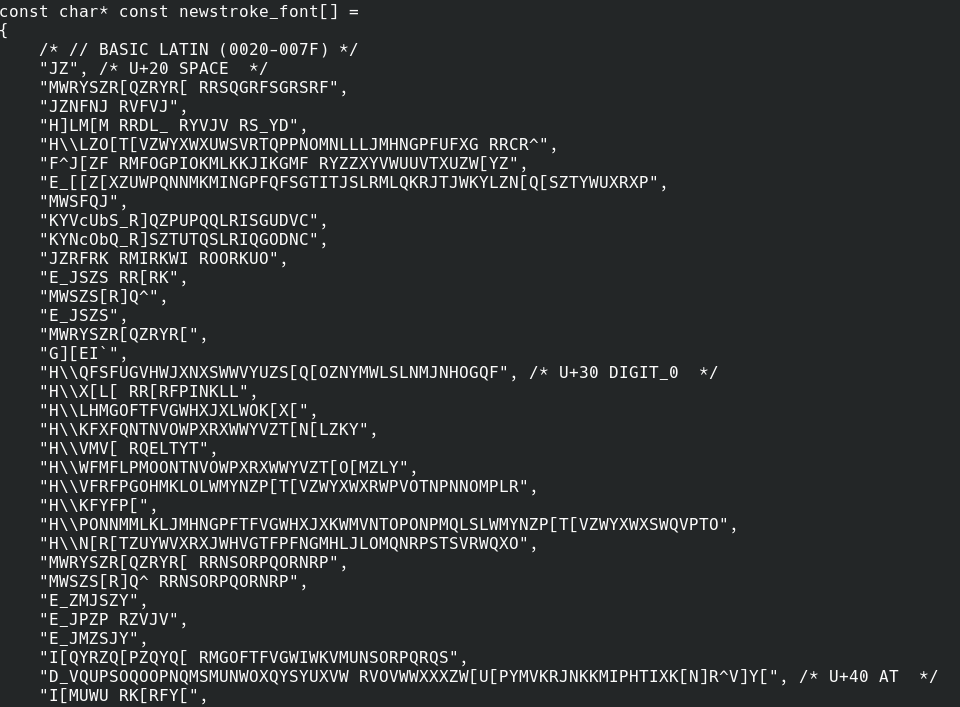
danderson@hachyderm.ioHmm not sure using the generated C++ font data is going to be easier... What on earth is going on in there...
 2
0
0
2
0
0
Dave Anderson
danderson@hachyderm.io// In stroke font, coordinates values are coded as <value> + 'R', where
// <value> is an ASCII char.
wat
Oh wait it gets better, each point is stored as a uint8 offset by "R", but that represents a float value between -1.0 and +1.0. So to get the coordinate, you take your uint8, subtract 0x52 (ascii "R"), then divide by 21 to get the coordinate.
Oh and the Y coordinate is actually offset by "Z" not "R", for legacy reasons.
Oh and the first two letters are the X/Y size of the glyph, and _those_ are both relative to "R", not "R" and "Z".
So now you parse those characters in pairs and that gives you coordinates. Oh and "<space>R" is a magic value for "raise the pen", i.e. don't draw a line between the two points it separates.
I mean, you know... it's quite cursed as a format, but once you know how to parse it... It's not that hard to convert back to geometry.
1
0
0
Dave Anderson
danderson@hachyderm.ioI have to assume this is some kind of cursed industrial control format, a distant cousin of gerber or something, and that the original Hershey fonts were in that format, and so as it evolved into Kicad's own font all these layers remained.
2
0
0
Brian Swetland
swetland@chaos.social@danderson I've definitely been assuming this all bottoms out in Hershey Font arcana eventually, but meanwhile have been enjoying your sausage factory tour in all its grisly detail....
0
0
0
Dave Anderson
danderson@hachyderm.ioOkay one nice thing about this cursed font encoding is that, with a little practice, you can kinda read the shape of glyphs from the raw data.
For example, "F^K[KFYFY[K[" is the little square that represents a character that's not supported by the font.
Remove the first two chars since those define the dimensions, then pair up the rest: K[ KF YF Y[ K[
Even without knowing the numeric equivalence, you can see how the pen is moving in a rectangular pattern.
1
0
0



James Morris (old account)
jmorris
0
0
0