
Julia Evans
b0rk@jvns.ca
what git jargon do you find confusing? thinking of writing a blog post that explains some of git's weirder terminology: "detached HEAD state”, "fast-forward", "index/staging area/staged", “ahead of 'origin/main' by 1 commit”, etc
(really only looking for terms that you personally find confusing, not terms that you think someone else might be confused about)
 22
22
 2
2
 0
0

Kevin Boyd (he/him) 🇨🇦
kboyd@phpc.social@b0rk there's some debate about origin and upstream themselves, and some folks recommend avoiding the terms entirely - perhaps that would be relevant?
0
0
0



Ian Coldwater 👻🌿
ian@hachyderm.io@b0rk my mama always told me I would forget my HEAD if it wasn't attached :(
0
0
0

Julia Evans
b0rk@jvns.ca@david i just learned what this means last week! it's such a weird term
0
0
0

Evan Prodromou
evan@cosocial.ca@b0rk why git rebase is supposedly good, yet also makes it impossible for me to push
2
0
0
Julia Evans
b0rk@jvns.ca@evan that's probably gonna have to be a different post, but I think there's this whole weird thing about rebase where people who like rebase have very specific rebase workflows (where if you deviate from them it really messes things up), but summarize the whole situation as "rebase is good"
(I say this as someone who really likes rebase)
0
0
0


Mark T. Tomczak
mark@mastodon.fixermark.com@b0rk reflog.
For everyone who has ever wished for an undo command in git, the closest thing it has is the reference log, which lists all the changes to branches and other references. You can use it to figure out what a name used to refer to and so reset it if things go off the rails.
That's simultaneously incredibly useful and brutally obscure.
1
0
0
Julia Evans
b0rk@jvns.ca@mark what do you find confusing about the reflog? it sounds like you know exactly what it does
0
0
0
Julia Evans
b0rk@jvns.ca@jomo are there terms you personally find confusing? i'm more interested in things that you're confused by than terms you think other people are confused by :)
1
0
0

Eric Beavers
elb@fosstodon.org@b0rk Merge vs Rebase vs Cherry-Pick would be a good start. Basically, I have to look up anything I do every time I do it. Don't know why I have such a mental block. It's just not conducive to being learnable for me (so far, but I keep trying!).
1
0
0

Dave Copeland 
davetron5000@ruby.social
@b0rk “upstream" and "downstream" have never made any sense to me and I can't even now remember precisely what they mean and so I don't use them at all.
2
0
0


@davetron5000 @b0rk also, it suggests a gradient - the existence of which is highly dependent on the individual project‘s governance.
0
0
0
Julia Evans
b0rk@jvns.ca@remi do you have one specific example that you think is especially bad?
0
0
0

Sven
svenluijten@mas.to@b0rk “checkout” is such a strange word for such a multifaceted command.
2
0
0

Bill Ricker
BRicker@fosstodon.org@svenluijten @b0rk
> checkout
... and reuses a term with specific meaning in legacy version control systems in a way only partially overlapping
0
0
0

@b0rk I find it jarring that the output of `git status` includes "Your branch is up to date with 'origin/main'", no matter how long it's been since the last fetch/pull =)
1
0
0
Julia Evans
b0rk@jvns.ca@olepbr huh I never thought about it that way, but yeah that's really weird
1
0
0

Dan Pope
danielthepope@mastodon.me.uk@b0rk when dealing with merge conflicts:
- resolve using “mine”
- resolve using “theirs”
I get it wrong every time!
Coming to think of it, is that git terminology or just SourceTree?
1
0
0

Julia Evans
b0rk@jvns.ca@cratermoon at first I thought "what could that possibly mean??" but I guess it means the first parent? I'll add it to the list!
0
0
0

ShadSterling
ShadSterling@mastodon.social@b0rk revert. Sometimes I want to revert changes I’ve made to my local copy, restoring things to the state they were in before it diverged from the commit I pulled, but the revert command does something apparently unrelated
1
0
0

johncarneyau
johncarneyau@mastodon.social@b0rk not jargon exactly, but I find the messaging regarding conflicts when merging or rebasing intensely confusing.
1
0
0
Julia Evans
b0rk@jvns.ca@johncarneyau do you mean the "ours" and "theirs”? or the >>>>>> HEAD<<<<<<<< stuff? or all of it?
0
0
0
Julia Evans
b0rk@jvns.ca@ellotheth thanks, this is a great example. (I can't keep them straight either)
0
0
0

pr06lefs
pr06lefs@mastodon.social@b0rk I have to look up how to cancel the last commit every time. Its always "oh right now I remember", after I see it.
submodule init vs update too. Is init for a new submodule or for the first time you check out a repo and need to get the submodules, but then update is similar and I guess you need to do both. Or not? And --recursive is missing from init (except in older versions of git), but you can do
git submodule update --init --recursive
1
0
0
Julia Evans
b0rk@jvns.ca@pr06lefs submodules are so weird, not convinced that anyone actually understands how to use them
0
0
0

@b0rk I feel like they switch the meaning of "ours" and "theirs" on context and it's almost never what I expect.
1
0
0
Julia Evans
b0rk@jvns.ca@TCBullfrog i just looked this up and they literally do, the meaning is the opposite for merge vs rebase. (for merge "ours" is the current branch, for rebase "theirs" is the current branch). So confusing.
0
0
0

Erin Paget, née Dees
undees@witches.live@b0rk Git’s use of “index” to mean “staging area” was… certainly a choice.
1
0
0

jomo
jomo@mstdn.io@b0rk i *know* many people find it confusing because I've explained it a lot to people who were confused about it, didn't know about it, and/or were afraid of rebases and hard resets. "re-flog" is an extremely common mispronunciation that contributes to the mystery of its function.
Personally i always find "ours" and "theirs" confusing, or HEAD when I'm in the process of some rebase / merge cconflict. Not very obvious what it refers to, and in some cases the opposite of what you're expecting.
1
0
0

Philippe Miossec
pmiossec@piaille.fr@b0rk @olepbr because git is Decentralized, git is not connected to a specific repository and you sync your repo with the remote repo only by doing a fetch (pull is doing a fetch first). And so 'origin/main' is the state of main in 'origin' repo **the last time you fetched**. So if you never fetch, git status compare with this 'local' ref that could be not in the same state of the branch in the remote repo.
2
0
0
0
0
0

mxk
mxk@hachyderm.io@b0rk "git rebase -i" usually not being used to actually rebase
The whole use of the term "checkout" in git is a giant confusion, given that git does not use checkouts the way other VCS do and legits use of the word "switch" is way more logical.
0
0
0

mhl20
mhl20@mastodon.me.uk@b0rk It's a few years old, so some of it's out of date now, but I wrote a blog post about confusing Git terminology that some people have told me is useful: https://longair.net/blog/2012/05/07/the-most-confusing-git-terminology/
1
1
0

Rep. Eric Gallager (no "h"!)
egallager@treehouse.systems@b0rk this entire webpage: https://gcc.gnu.org/gitwrite.html
0
0
0
Philippe Miossec
pmiossec@piaille.fr@b0rk sorry I was not answering to you but to the previous toot that was expressing confusion on a subject.
I used to answer to the last toot to not create multiple threads harder to follow (but maybe it's not the right way to do?!)
I'm pretty sure your blog post will explain that a lot better but it was to provide earlier explanation.
I know you are much more well versed than me in a lot of computer subjects and I had no intention to explain you something. Just answering others doubts...
1
0
0
Julia Evans
b0rk@jvns.ca@pmiossec Explaining git concepts to people isn't the point of this thread and it's not helpful.
0
0
0
Julia Evans
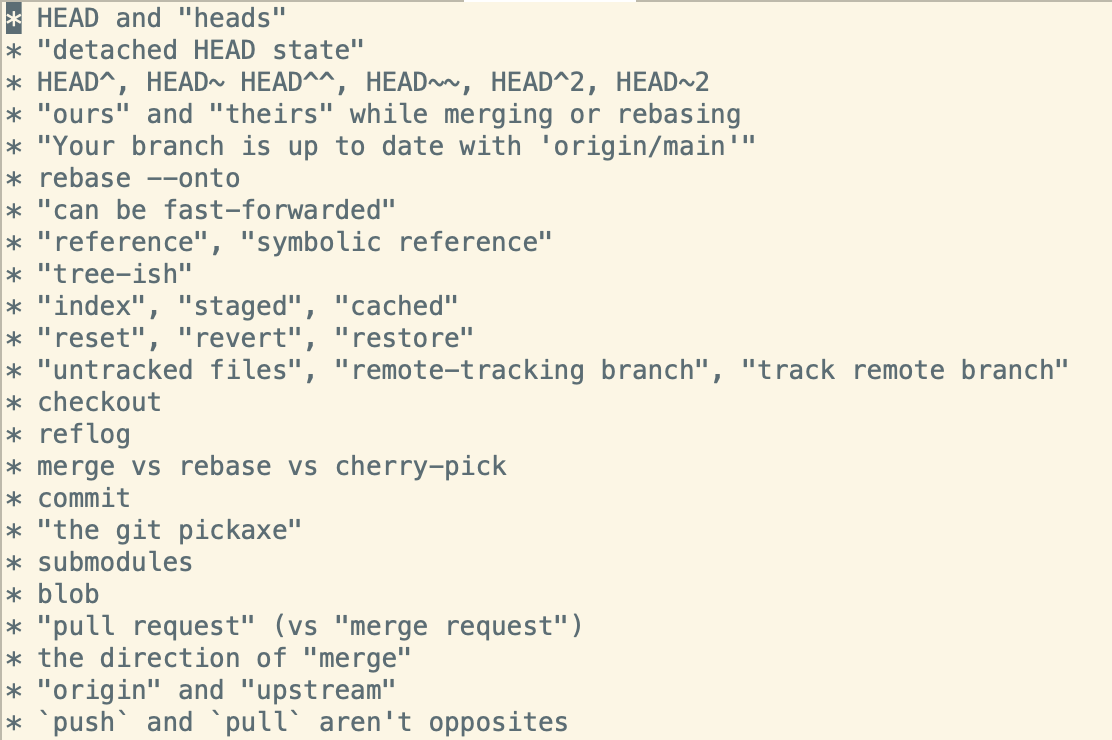
b0rk@jvns.cahere's a list of the git terms people have mentioned being confused by so far, would love to know which confusing terms I’ve missed! https://gist.github.com/jvns/dfe5a8a7133b3c13b633eab57b70ebb1
 8
1
0
8
1
0

Greg Wilson
gvwilson@mastodon.social@b0rk serious Q: are there any Git-specific terms that _don't_ confuse people?
1
0
0
Julia Evans
b0rk@jvns.ca@gvwilson I don't think anyone has reported being confused about what "git add file.txt" does yet. Also very few people said they were confused about what a "commit" is. After that I think it gets a lot gnarlier.
0
0
0
Julia Evans
b0rk@jvns.ca@nicr9 that's the plan, fingers crossed. it's not going to be an easy one to write though
0
0
0

Jack Jackson
scubbo@fosstodon.org@benjamingeer @b0rk +1 to this. "Rebase and merge" sounds like nonsense to me - surely the operation is either a rebase xor a merge, it can't be both at once?
1
0
0
Julia Evans
b0rk@jvns.ca@scubbo @benjamingeer "rebase and merge" means the equivalent of
- git switch branch_name
- git rebase main
- git switch main
- git merge branch_name
the "merge" is a fast-forward merge though -- it doesn't create a merge commit, it just moves `main` forward to where `branch_name` is
0
0
0

Pedro Cambra
pcambra@drupal.community@benjamingeer @b0rk with rebase you take your local commits and apply them one by one on top of HEAD, squash unifies all the branch commits into a single one and both merge the pull request which I understand is github vocabulary for pull requests
1
0
0

Marek
mark22k@layer8.space@benjamingeer @b0rk In this context, squash means that all commits in the PR are combined into one. Afterwards, this one commit is then merged normally.
0
0
0
Jack Jackson
scubbo@fosstodon.org@pcambra "and both merge the pull request which I understand is GitHub terminology"
Thank you for explaining that! I'd been confused for ages.
That's a poor choice of words (since "merge" already means something in the context of "moving changes from one commit to another"), right? I'm not just biased by my dislike of GitHub's PR process?
1
0
0
Pedro Cambra
pcambra@drupal.community@benjamingeer @b0rk there’s a git merge —squash modifier which I guess it’s what github ends up calling
0
0
0
Pedro Cambra
pcambra@drupal.community@scubbo gitlab calls merge requests to what github calls pull requests which tbh I don’t know if it makes it better or worse 😂
0
0
0

John
jches@hachyderm.io@benjamingeer @pcambra @b0rk If I remember correctly...squash is one of the options for individual commits if you do an interactive rebase. Github's squash and merge does a rebase, but selects "squash" for all commits, so it ends up as a single commit.
...I think! 🤔
0
0
0
John
jches@hachyderm.io@benjamingeer @pcambra @b0rk Yeah, if you are manually doing an interactive rebase it's likely in order to resolve some conflict, in my experience. But there aren't always conflicts; GitHub just checks for conflicts before enabling the "squash and merge" (or any flavor of merge) button, don't they?
0
0
0
Pedro Cambra
pcambra@drupal.community@benjamingeer @jches @b0rk that’s probably because git rebase -i is “rebase flavoured” whereas github squash and merge is “merge flavoured” (git merge —squash)
0
0
0

Josh Dick 
josh@joshdick.net
@b0rk double-dot vs triple-dot in commit ranges. Easy enough to look up but I never remember the answer once I've done so.
1
0
0
Julia Evans
b0rk@jvns.ca@josh that's a great one. just so I understand: where do you use double-dot vs triple-dot? in `git log main..mybranch`? is there somewhere else it's used?
1
0
0

Joe Crawford
artlung@xoxo.zone@b0rk the --force option on a push always makes me go back to the documentation. some teams seem to really like using that and it kind of mystifies me why that is.
2
0
0


Julia Evans
b0rk@jvns.ca@benjamingeer @jches @pcambra I just learned from this stack overflow comment that `git merge --squash` is an option to git merge https://stackoverflow.com/a/25387972 that sounds like exactly what “squash and merge" does
1
0
0

xander
metasyn@merveilles.town@b0rk I'm still trying to learn how to use git worktree in my workflow. another one I recently encountered but don't fully understand is the concept of "cone mode" in git sparse checkout. oh, and and the phrase "git porcelain" was kinda vexing when I first heard it
1
0
0
Joe Crawford
artlung@xoxo.zone@b0rk once you learn it, the "squash" merge is terrific and mostly self explanatory but I've explained merges vs squash merges rather more times than I can count!
1
0
0
Julia Evans
b0rk@jvns.ca@artlung thanks, genuinely did not know that `git merge --squash` was a thing (I thought it was a special github feature). Do you do `git merge --squash` on the command line?
0
0
0

joachim
joachim@drupal.community@b0rk IIRC 'incoming' and 'current' invert their meanings in a merge or a rebase?
1
0
0
Julia Evans
b0rk@jvns.ca@joachim where do you see "incoming" and "current"? is that a vscode term or a git term?
(not trying to nitpick, I've just never seen those terms before and I'm trying to figure out why not since a lot of other people have mentioned the exact same thing)
0
0
0
Josh Dick
josh@joshdick.net
@b0rk `git diff` also understands those ranges, as well as in URLs to arbitrary diffs on GitHub IIRC.
1
0
0
Julia Evans
b0rk@jvns.ca@josh thanks! now I need to figure out what the difference between `git diff thing1 thing2` and `git diff thing1..thing2` is
0
0
0

Dave Neary
dneary@mastodon.ie@b0rk Ooh - I love this list! I'd add stash (as in, "your local changes would be over-written, commit or stash them"). And frankly the whole untracked vs local modified vs local added (but not committed yet) vs local committed vs pushed to remote origin is confusing sometimes.
Also pull = fetch + merge is confusing. But 'rebase -i' (or --interactive) is wonderful black magic that everyone should know!
0
0
0
Dave Neary
dneary@mastodon.ie@benjamingeer @pcambra @b0rk Yes! This is the black magic of "git rebase --interactive" (or "git rebase -i") - it presents all of the commits since a branch point, and you can drop, reorder, edit commit messages, or squash them in the process.
0
0
0
Julia Evans
b0rk@jvns.careally really appreciate how willing everyone is to share what git jargon they find confusing -- i know talking about your confusion on the internet can be kind of weird but it's SO helpful. So many incredible responses in this thread.
1
0
0

Brian
bgannin@mastodon.social@b0rk One that’s a bit perpendicular but relevant IMHO is distributed. The decentralized nature of git isn’t one people really encounter, it’s typically the tried and true client/server solution.
1
0
0
Julia Evans
b0rk@jvns.ca@bgannin i appreciate that but I'm not really looking for folks' theories about why git is confusing -- one of the things i appreciate most about the replies to this one is that people really stuck to the question I asked ("which terms do you find confusing”) and it was amazing
0
0
0